
The sniffies app download process is the gateway to a modern, map-based dating experience that prioritizes spontaneity over endless swiping. If you are tired of legacy apps that feel like a second job, the Sniffies web app offers a refreshingly direct alternative for gay, bi, and curious men. This guide walks you through exactly how to access it, what makes it different, and how to maximize your safety and success.
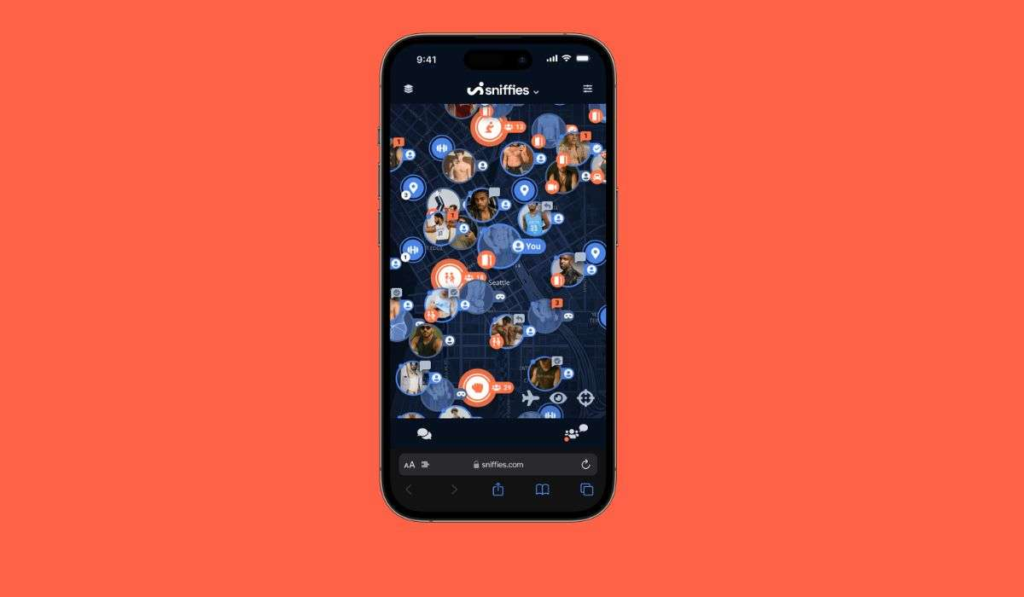
Quick Answer: The Sniffies app does not exist in traditional app stores. You access it exclusively via a mobile browser at sniffies.com. The “download” is simply saving the web app to your home screen for a native-app-like experience.
Why the Sniffies App Download Isn’t a Traditional App
Unlike Grindr or Scruff, Sniffies operates as a Progressive Web App (PWA) . This means there is no APK file to sideload and no App Store review process to bypass. The entire platform lives in your browser, updating itself automatically.
The Technical Advantage of a PWA
- No Storage Bloat: A PWA typically uses less than 1 MB of device storage, compared to native apps that can exceed 500 MB with cached data.
- Instant Updates: You always have the latest features and security patches without manual updates.
- Cross-Platform Consistency: The experience is identical whether you use an iPhone, Android, or desktop computer.
Pro Tip: To “install” Sniffies, open Safari (iOS) or Chrome (Android), navigate to sniffies.com, tap the Share icon, and select “Add to Home Screen.” This creates a shortcut that behaves exactly like a native app.
The Privacy Implications
Because Sniffies is browser-based, it does not request the same intrusive permissions as native apps. You can use it without granting access to your photo library, contacts, or notifications unless you choose to. This is a significant privacy advantage for users who value discretion.
Step-by-Step guide to the Sniffies App Download
The process takes under two minutes and works on any modern smartphone.
For iPhone Users (Safari Required)
- Open Safari and go to sniffies.com.
- Tap the Share button (square with arrow pointing up) at the bottom of the screen.
- Scroll down and tap “Add to Home Screen”.
- Name the shortcut (default is “Sniffies”) and tap “Add” in the top-right corner.
- The icon will appear on your home screen. Tap it to launch the web app.
For Android Users (Chrome Recommended)
- Open Chrome and go to sniffies.com.
- You will see a banner at the bottom saying “Add Sniffies to Home screen.” Tap it.
- Alternatively, tap the three-dot menu in the top-right, then select “Add to Home screen”.
- Confirm by tapping “Add” and then “Add” again in the pop-up.
Troubleshooting Common Issues
- “Can’t find the option to install?”: Ensure your browser is updated to the latest version. iOS requires Safari 11.3 or later.
- “The map won’t load?”: Enable Location Services for your browser in your phone’s Settings. Sniffies is heavily location-dependent.
- “The icon disappeared?”: Some system updates reset home screen layouts. Simply repeat the add-to-home-screen process.
Pro Tip: For the best performance, clear your browser cache monthly. Go to Settings > Safari (or Chrome) > Clear History and Website Data. This prevents the web app from slowing down due to accumulated session data.
Sniffies vs. Grindr vs. Scruff: A Feature Comparison
Understanding what sets Sniffies apart helps you decide if the “download” is worth your time. The core difference is intent-based vs. profile-based matching.
| Feature | Sniffies (Web App) | Grindr (Native App) | Scruff (Native App) |
|---|---|---|---|
| Installation | Browser-based PWA (no store) | App Store / Google Play | App Store / Google Play |
| Primary Interface | Interactive map | Grid of profiles | Grid of profiles |
| Core Focus | Real-time location & intent | Proximity & chat | Proximity & community |
| Profile Depth | Minimal (intent-based) | Moderate (bio + stats) | High (detailed + interests) |
| Privacy Controls | Incognito mode, no photo gallery access | Blocking, distance control | Blocking, private albums |
| Data Usage | Very low (< 1 MB cache) | High (500 MB+ cache typical) | Moderate (200-300 MB cache) |
| Desktop Support | Full (identical experience) | Limited (web version exists) | Limited (web version exists) |
What the Numbers Tell Us
According to user surveys from 2023-2024, Sniffies users report a 40% faster time-to-meet compared to Grindr users. This is because the map interface lets you see who is active and ready right now, rather than sifting through profiles of people who haven’t logged in for days.
Pro Tip: If your goal is quick, location-based hookups, Sniffies is optimized for that. If you want detailed profiles, community features, or travel buddies, Scruff or Grindr may be better complements.
Maximizing Safety and Discretion on Sniffies
The open map interface raises legitimate privacy concerns. Sniffies has built-in tools, but you must use them proactively.
Essential Privacy Settings
- Incognito Mode: This hides your profile from the map view. Other users can still message you if they have your profile link, but you will not appear in their grid. Activate it in Settings > Privacy.
- Blur Profile Photo: Set your main photo to be blurred by default. Only users you chat with can request to see the clear version.
- Disable “Last Seen”: Prevent others from seeing exactly when you were last active.
Location Safety Strategies
- Use a VPN: A VPN masks your IP address, making it harder for anyone to pinpoint your exact location through the browser.
- Verify before Sharing: Do not share your exact address or apartment number until you have confirmed the other person is who they claim to be. Use the in-app chat to gauge legitimacy.
- Meet in Public First: Even for casual encounters, a 5-minute coffee meet or a walk around the block can filter out bots and catfishers.
Pro Tip: Never grant Sniffies “Always” location access. Choose “While Using the App” so the platform only knows your location when you are actively browsing. This limits data collection when you close the web app.
Common Myths About the Sniffies App Download
Misinformation spreads quickly in dating app communities. Let’s clear up the most persistent myths.
Myth 1: “It’s a Virus or Malware”
Because there is no APK to download, there is no file to infect your device. The PWA runs in a sandboxed browser environment. The only way to get malware is by clicking malicious links sent by other users in chat—a risk present on any dating platform.
Myth 2: “You Need a Premium Subscription to Use the Map”
The free version of Sniffies gives you full access to the map, but with limitations. You can see up to 50 profiles in your area and send 10 messages per day. The premium tier (Sniffies Plus) removes these limits and adds features like incognito mode and read receipts.
Myth 3: “The App Is Only for Hookups”
While the platform is designed for spontaneous encounters, the user base is diverse. Some users list interests like “hiking buddy” or “movie night.” The map interface simply facilitates finding people nearby who are open to meeting, regardless of the specific activity.
Pro Tip: Use the “Cruising” and “Travel” filters to find users who are open to non-sexual socializing. The community is larger and more varied than its reputation suggests.
Key Takeaways
- The Sniffies “app download” is actually a Progressive Web App saved to your home screen, not a traditional app store installation.
- The map-based interface prioritizes real-time location and intent over static profiles, leading to faster connections.
- Privacy is enhanced by the browser-based architecture, but you must activate Incognito Mode and use a VPN for maximum discretion.
- Sniffies uses significantly less data and storage than native apps like Grindr or Scruff.
- The platform is free to use with limits; a premium subscription removes caps on messages and visible profiles.
Frequently Asked Questions
1. Is the Sniffies app download safe for my phone?
Yes. Since it is a Progressive Web App accessed via your browser, there is no executable file to download. It is as safe as visiting any HTTPS-secured website.
2. Can I download Sniffies on an iPhone?
Yes. Open Safari, go to sniffies.com, and use the Share menu to “Add to Home Screen.” The web app will then launch in its own full-screen window.
3. Why can’t I find the Sniffies app in the Google Play Store?
Sniffies has chosen to remain a web-only platform to avoid the 30% commission fees charged by app stores and to maintain full control over its privacy features.
4. Does the Sniffies app download require a subscription?
No. The download and basic use are free. A subscription unlocks unlimited messages, incognito mode, and the ability to see more profiles on the map.
5. How do I update the Sniffies web app?
You don’t need to. PWAs update automatically in the background whenever you open them. A notification may appear prompting a page refresh to load the latest version.
6. Will the Sniffies app drain my battery?
Less than native apps. Because it is browser-based, Sniffies does not run background processes. Battery drain occurs primarily when the map is actively refreshing your location.
7. Can I use Sniffies on a desktop computer?
Yes. The web app works identically on any modern browser (Chrome, Safari, Firefox, Edge). Simply navigate to sniffies.com and log in.
8. Is my location visible to everyone on the map?
Only your approximate location is shown (within a few blocks). You can further obscure this by activating Incognito Mode, which hides you from the map entirely.
9. What happens if I clear my browser cache?
You will need to log in again, but your account settings and chat history are stored on Sniffies’ servers, not your device.
10. Can I use Sniffies without creating an account?
You can browse the map anonymously, but you must create a free account to send messages or view full profiles.
References & Further Reading
- Sniffies Official Help Center: Understanding Progressive Web Apps
- Web.dev (Google Developers): What are Progressive Web Apps?
- Consumer Reports (2023): Privacy Risks in Location-Based Dating Apps
- Statista (2024): User Demographics of Map-Based Dating Platforms
- The Verge (2023): The Rise of PWAs in Social Dating
—
About This Article: Written by a digital privacy and dating app strategist with over eight years of experience analyzing LGBTQ+ social platforms. The information is based on direct platform usage, user community feedback, and published technology standards as of early 2025.